
The NeuroFlow Risk Algorithm uses technology to determine the risk level in response to an individual's activity on the NeuroFlow app.
We’re excited to share an upgrade to the NeuroFlow Risk Algorithm! This upgrade will provide more insight into an individual's shared journal entries without having to assess every journal entry that is shared with you.
You will now have even more information to determine clear and consistent next steps to help "Urgent" and "At-Risk" individuals.
How Does This Work?
Through the use of Natural Language Processing (NLP), we are now enhancing our NeuroFlow algorithm to gain additional insight into an individual’s journal entries. As a result, technology simplifies the process of reviewing an individual's journal by flagging specific entries for you.
This additional feature allows you to review and confirm an individual's risk and determine appropriate next steps. As a result, this is a simplified workflow for you with clear guidelines to provide a consistent individual response to mitigate risk.
At a glance:
Urgent Alert  : Why NeuroFlow Flagged This Entry:
- Risky words that were not preceded by a negation (e.g. "not suicidal" would not be considered urgent).
- Risky words that were not preceded by a third party noun or a pronoun (e.g. "Their suicide").
- The journal was in response to a prompt that we determined may be risky. This journal is not an Exposure category journal. (Exposure journals may be lower risk because risky words may have been prompted as part of therapy).

At-Risk Alert : Why NeuroFlow Flagged This Entry:
- Risky words that were preceded by a negation (e.g. "not suicidal" would not be considered urgent).
- Risky words that were preceded by a third-party noun or a pronoun (e.g. "Their suicide").
- The journal was in response to a prompt that we have determined may be risky. This journal is not an Exposure category journal (Exposure journals may be a lower risk because risky words have been prompted as part of therapy).

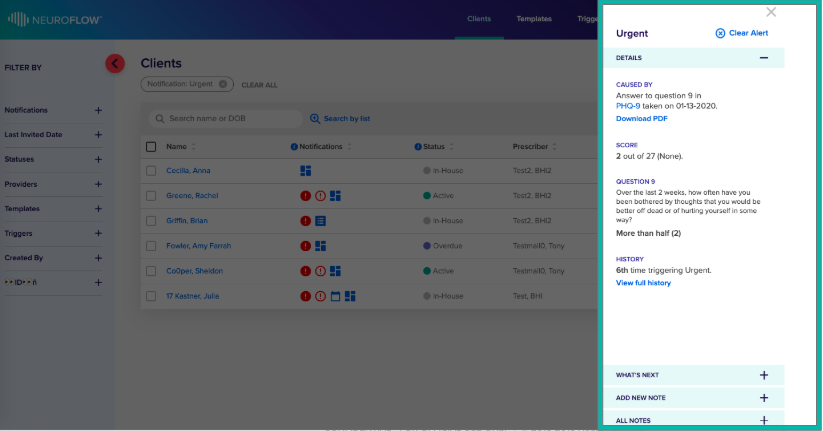
You can confirm Risk Level via Risk Management Slide-Out:

Please reach out to support@neuroflow.com for any questions.
Comments
0 comments
Article is closed for comments.